90deg = 100grad = 0.25turn ≈ 1.570796326794897rad
2018年5月9日 星期三
2018年5月1日 星期二
jq.css 相關有用函示
(function () {
let rcssNum = /^(?:([+-])=|)([+-]?(?:\d*\.|)\d+(?:[eE][+-]?\d+|))([a-z%]*)$/i;
rcssNum = /^(?:([+-])=)?(\-{0,1}(?:\d+|\d+\.\d+))([a-z%]*)$/i;
let rmsPrefix = /^-ms-/;
let rdashAlpha = /-([a-z])/g;
let rcustomProp = /^--/;
let cssNumber = {
animationIterationCount: true,
columnCount: true,
fillOpacity: true,
flexGrow: true,
flexShrink: true,
fontWeight: true,
lineHeight: true,
opacity: true,
order: true,
orphans: true,
widows: true,
zIndex: true,
zoom: true
};
//==========================================================================
// Convert dashed to camelCase; used by the css and data modules
// Support: IE <=9 - 11, Edge 12 - 13
// Microsoft forgot to hump their vendor prefix (#9572)
function camelCase(string) {
// rmsPrefix = /^-ms-/
// rdashAlpha = /-([a-z])/g
return string.replace(rmsPrefix, "ms-").replace(rdashAlpha, fcamelCase);
}
//==========================================================================
// Return a property mapped along what jQuery.cssProps suggests or to
// a vendor prefixed property.
function finalPropName(name) {
// jQuery.cssProps = {float: }
var ret = jQuery.cssProps[name];
if (!ret) {
ret = jQuery.cssProps[name] = vendorPropName(name) || name;
}
return ret;
}
//==========================================================================
// Return a css property mapped to a potentially vendor prefixed property
// 針對不同瀏覽器的 prefixes
function vendorPropName(name) {
// Shortcut for names that are not vendor prefixed
// emptyStyle
if (name in emptyStyle) {
return name;
}
// Check for vendor prefixed names
var capName = name[0].toUpperCase() + name.slice(1),
i = cssPrefixes.length;
while (i--) {
name = cssPrefixes[i] + capName;
if (name in emptyStyle) {
return name;
}
}
}
//==========================================================================
function style(elem, name, value, extra) {
debugger;
// Don't set styles on text and comment nodes
// nodeType:(3:text, 8:comment)
if (!elem || elem.nodeType === 3 || elem.nodeType === 8 || !elem.style) {
return;
}
// Make sure that we're working with the right name
var ret, type, hooks;
var origName = jQuery.camelCase(name);
// rcustomProp:/^--/
var isCustomProp = rcustomProp.test(name);
var style = elem.style;
// Make sure that we're working with the right name. We don't
// want to query the value if it is a CSS custom property
// since they are user-defined.
// 名稱的統一與修正
if (!isCustomProp) {
name = finalPropName(origName);
}
// Gets hook for the prefixed version, then unprefixed version
hooks = jQuery.cssHooks[name] || jQuery.cssHooks[origName];
// Check if we're setting a value
if (value !== undefined) {
debugger;
type = typeof value;
// Convert "+=" or "-=" to relative numbers (#7345)
if (type === "string" && (ret = rcssNum.exec(value)) && ret[1]) {
// here
value = adjustCSS(elem, name, ret);
// Fixes bug #9237
type = "number";
}
// Make sure that null and NaN values aren't set (#7116)
if (value == null || value !== value) {
return;
}
// If a number was passed in, add the unit (except for certain CSS properties)
if (type === "number") {
value += ret && ret[3] || (jQuery.cssNumber[origName] ? "" : "px");
}
// background-* props affect original clone's values
if (!support.clearCloneStyle && value === "" && name.indexOf("background") === 0) {
style[name] = "inherit";
}
// If a hook was provided, use that value, otherwise just set the specified value
if (!hooks || !("set" in hooks) ||
(value = hooks.set(elem, value, extra)) !== undefined) {
if (isCustomProp) {
style.setProperty(name, value);
} else {
style[name] = value;
}
}
} else {
// If a hook was provided get the non-computed value from there
if (hooks && "get" in hooks &&
(ret = hooks.get(elem, false, extra)) !== undefined) {
return ret;
}
// Otherwise just get the value from the style object
return style[name];
}
}
//==========================================================================
// elem: dom
// prop: cssKey
// valueParts(單位與數值)
function adjustCSS(elem, prop, valueParts, tween) {
debugger;
var adjusted;
var scale = 1;
var maxIterations = 20;
//----------------------------
// 獲取現在的值
var currentValue = tween ?
function () {
return tween.cur();
} :
function () {
return jQuery.css(elem, prop, "");
};
var initial = currentValue();
//----------------------------
// 設定的單位
let unit;
if (valueParts && valueParts[3]) {
unit = valueParts[3];
} else {
unit = (jQuery.cssNumber[prop] ? "" : "px");
}
//----------------------------
// 預設單位
// Starting value computation is required for potential unit mismatches
var initialInUnit = (jQuery.cssNumber[prop] || unit !== "px" && +initial);
if (initialInUnit) {
initialInUnit = rcssNum.exec(jQuery.css(elem, prop));
}
//----------------------------
// 若預設單位與設定單位不同
// 必須進入轉換
if (initialInUnit && initialInUnit[3] !== unit) {
// Trust units reported by jQuery.css
unit = unit || initialInUnit[3];
// Make sure we update the tween properties later on
valueParts = valueParts || [];
// Iteratively approximate from a nonzero starting point
initialInUnit = +initial || 1;
do {
// If previous iteration zeroed out, double until we get *something*.
// Use string for doubling so we don't accidentally see scale as unchanged below
scale = scale || ".5";
// Adjust and apply
initialInUnit = initialInUnit / scale;
jQuery.style(elem, prop, initialInUnit + unit);
// Update scale, tolerating zero or NaN from tween.cur()
// Break the loop if scale is unchanged or perfect, or if we've just had enough.
} while (
(function () {
debugger;
let c_value = currentValue();
let a = scale;
// initial(一開始的值)
// 用目標單位移動後,取比例值,供下次修正
let b = scale = (c_value / initial);
return (a !== b) && (scale !== 1) && --maxIterations;
})()
);
}
//----------------------------
if (valueParts) {
initialInUnit = +initialInUnit || +initial || 0;
// Apply relative offset (+=/-=) if specified
adjusted = valueParts[1] ?
initialInUnit + (valueParts[1] + 1) * valueParts[2] :
+valueParts[2];
if (tween) {
tween.unit = unit;
tween.start = initialInUnit;
tween.end = adjusted;
}
}
return adjusted;
}
;
})();
let rcssNum = /^(?:([+-])=|)([+-]?(?:\d*\.|)\d+(?:[eE][+-]?\d+|))([a-z%]*)$/i;
rcssNum = /^(?:([+-])=)?(\-{0,1}(?:\d+|\d+\.\d+))([a-z%]*)$/i;
let rmsPrefix = /^-ms-/;
let rdashAlpha = /-([a-z])/g;
let rcustomProp = /^--/;
let cssNumber = {
animationIterationCount: true,
columnCount: true,
fillOpacity: true,
flexGrow: true,
flexShrink: true,
fontWeight: true,
lineHeight: true,
opacity: true,
order: true,
orphans: true,
widows: true,
zIndex: true,
zoom: true
};
//==========================================================================
// Convert dashed to camelCase; used by the css and data modules
// Support: IE <=9 - 11, Edge 12 - 13
// Microsoft forgot to hump their vendor prefix (#9572)
function camelCase(string) {
// rmsPrefix = /^-ms-/
// rdashAlpha = /-([a-z])/g
return string.replace(rmsPrefix, "ms-").replace(rdashAlpha, fcamelCase);
}
//==========================================================================
// Return a property mapped along what jQuery.cssProps suggests or to
// a vendor prefixed property.
function finalPropName(name) {
// jQuery.cssProps = {float: }
var ret = jQuery.cssProps[name];
if (!ret) {
ret = jQuery.cssProps[name] = vendorPropName(name) || name;
}
return ret;
}
//==========================================================================
// Return a css property mapped to a potentially vendor prefixed property
// 針對不同瀏覽器的 prefixes
function vendorPropName(name) {
// Shortcut for names that are not vendor prefixed
// emptyStyle
if (name in emptyStyle) {
return name;
}
// Check for vendor prefixed names
var capName = name[0].toUpperCase() + name.slice(1),
i = cssPrefixes.length;
while (i--) {
name = cssPrefixes[i] + capName;
if (name in emptyStyle) {
return name;
}
}
}
//==========================================================================
function style(elem, name, value, extra) {
debugger;
// Don't set styles on text and comment nodes
// nodeType:(3:text, 8:comment)
if (!elem || elem.nodeType === 3 || elem.nodeType === 8 || !elem.style) {
return;
}
// Make sure that we're working with the right name
var ret, type, hooks;
var origName = jQuery.camelCase(name);
// rcustomProp:/^--/
var isCustomProp = rcustomProp.test(name);
var style = elem.style;
// Make sure that we're working with the right name. We don't
// want to query the value if it is a CSS custom property
// since they are user-defined.
// 名稱的統一與修正
if (!isCustomProp) {
name = finalPropName(origName);
}
// Gets hook for the prefixed version, then unprefixed version
hooks = jQuery.cssHooks[name] || jQuery.cssHooks[origName];
// Check if we're setting a value
if (value !== undefined) {
debugger;
type = typeof value;
// Convert "+=" or "-=" to relative numbers (#7345)
if (type === "string" && (ret = rcssNum.exec(value)) && ret[1]) {
// here
value = adjustCSS(elem, name, ret);
// Fixes bug #9237
type = "number";
}
// Make sure that null and NaN values aren't set (#7116)
if (value == null || value !== value) {
return;
}
// If a number was passed in, add the unit (except for certain CSS properties)
if (type === "number") {
value += ret && ret[3] || (jQuery.cssNumber[origName] ? "" : "px");
}
// background-* props affect original clone's values
if (!support.clearCloneStyle && value === "" && name.indexOf("background") === 0) {
style[name] = "inherit";
}
// If a hook was provided, use that value, otherwise just set the specified value
if (!hooks || !("set" in hooks) ||
(value = hooks.set(elem, value, extra)) !== undefined) {
if (isCustomProp) {
style.setProperty(name, value);
} else {
style[name] = value;
}
}
} else {
// If a hook was provided get the non-computed value from there
if (hooks && "get" in hooks &&
(ret = hooks.get(elem, false, extra)) !== undefined) {
return ret;
}
// Otherwise just get the value from the style object
return style[name];
}
}
//==========================================================================
// elem: dom
// prop: cssKey
// valueParts(單位與數值)
function adjustCSS(elem, prop, valueParts, tween) {
debugger;
var adjusted;
var scale = 1;
var maxIterations = 20;
//----------------------------
// 獲取現在的值
var currentValue = tween ?
function () {
return tween.cur();
} :
function () {
return jQuery.css(elem, prop, "");
};
var initial = currentValue();
//----------------------------
// 設定的單位
let unit;
if (valueParts && valueParts[3]) {
unit = valueParts[3];
} else {
unit = (jQuery.cssNumber[prop] ? "" : "px");
}
//----------------------------
// 預設單位
// Starting value computation is required for potential unit mismatches
var initialInUnit = (jQuery.cssNumber[prop] || unit !== "px" && +initial);
if (initialInUnit) {
initialInUnit = rcssNum.exec(jQuery.css(elem, prop));
}
//----------------------------
// 若預設單位與設定單位不同
// 必須進入轉換
if (initialInUnit && initialInUnit[3] !== unit) {
// Trust units reported by jQuery.css
unit = unit || initialInUnit[3];
// Make sure we update the tween properties later on
valueParts = valueParts || [];
// Iteratively approximate from a nonzero starting point
initialInUnit = +initial || 1;
do {
// If previous iteration zeroed out, double until we get *something*.
// Use string for doubling so we don't accidentally see scale as unchanged below
scale = scale || ".5";
// Adjust and apply
initialInUnit = initialInUnit / scale;
jQuery.style(elem, prop, initialInUnit + unit);
// Update scale, tolerating zero or NaN from tween.cur()
// Break the loop if scale is unchanged or perfect, or if we've just had enough.
} while (
(function () {
debugger;
let c_value = currentValue();
let a = scale;
// initial(一開始的值)
// 用目標單位移動後,取比例值,供下次修正
let b = scale = (c_value / initial);
return (a !== b) && (scale !== 1) && --maxIterations;
})()
);
}
//----------------------------
if (valueParts) {
initialInUnit = +initialInUnit || +initial || 0;
// Apply relative offset (+=/-=) if specified
adjusted = valueParts[1] ?
initialInUnit + (valueParts[1] + 1) * valueParts[2] :
+valueParts[2];
if (tween) {
tween.unit = unit;
tween.start = initialInUnit;
tween.end = adjusted;
}
}
return adjusted;
}
;
})();

2018年4月28日 星期六
將 matrix 轉換成 scale, rotate

function getMatrix(dom) {
debugger;
let css = window.getComputedStyle(dom);
let _matrix = css['transform'];
if (/none/i.test(_matrix)) {
// 若沒有設定 matrix
$(dom).css({
transform: 'scale(1)'
});
// debugger;
_matrix = css['transform'];
}
// 每一deg=幾度
let RAD_TO_DEG = 180 / Math.PI;
let reg = /matrix\((.*)\)/;
let res = reg.exec(_matrix);
_matrix = res[1];
let matrix = [[],[]];
let position = [];
_matrix = _matrix.split(',');
for (let i = 0; i < _matrix.length; i++) {
let m = Math.floor(i/2);
let n = i % 2;
let value = _matrix[i].replace(/^\s*|\s*$/g, '');
value = parseFloat(value, 10);
if(i < 4){
matrix[m][n] = value
}else{
position.push(value);
}
}
console.dir(matrix);
console.dir(position);
return {
translate: {
x: (e + 'px'),
y: (f + 'px')
},
rotate: (rotate + 'deg'),
scale: {
x: scaleX,
y: scaleY
}
}
}
2018年4月26日 星期四
php 小技巧
※判斷是否開啟頁面,catch
if (ob_get_level() == 0) {
// 尚未啟動 ob_start
ob_start();
}
-----------------------------------------------
※判斷是否啟用 session
if (!isset($_SESSION)) {
session_start();
}
-----------------------------------------------
if (ob_get_level() == 0) {
// 尚未啟動 ob_start
ob_start();
}
-----------------------------------------------
※判斷是否啟用 session
if (!isset($_SESSION)) {
session_start();
}
-----------------------------------------------
2018年4月19日 星期四

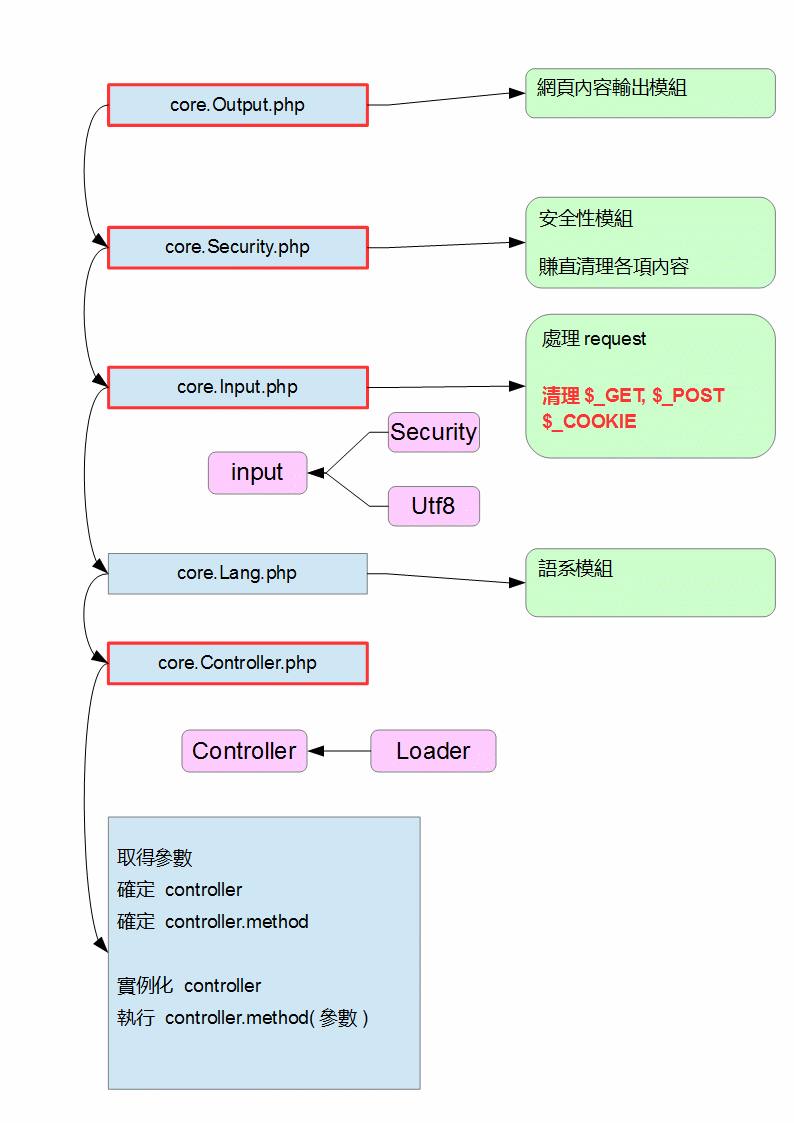


js 仿製 php (serialize)

module.exports = serialize;
function serialize(data) {
let res = '';
for (let i = 0, method; method = serialize.methods[i]; i++) {
let temp;
try {
temp = method(data);
res = temp;
break;
} catch (error) {
if (error instanceof TypeError) {
continue;
} else {
throw error;
}
}
}
return res;
}
//==============================================================================
(function (self) {
self.methods = [
function (data) {
// string
if (typeof data !== 'string') {
throw new TypeError();
}
let res = 'String:' + String(data.length) + ':"' + data + '"';
return res;
},
function (data) {
// number
if (typeof data !== 'number') {
throw new TypeError();
}
let res = 'Number:' + data;
return res;
},
function (data) {
// undefined
if (typeof data !== 'undefined') {
throw new TypeError();
}
let res = 'undefined';
return res;
},
function (data) {
// null
if (data !== null) {
throw new TypeError();
}
let res = 'null';
return res;
},
function (data) {
// array
if (!Array.isArray(data)) {
throw new TypeError();
}
//----------------------------
let res = 'Array:' + data.length + ':{';
for (let i = 0; i < data.length; i++) {
res += 'Number:' + i + ';';
// 進入遞迴
let _res = serialize(data[i]);
res += _res + ';'
}
res += '}';
return res;
},
//============================
function (data) {
// {}
if (typeof data !== 'object' && data == null) {
throw new TypeError();
}
let type = Object.prototype.toString.call(data);
if (!/\[object Object\]/.test(data)) {
throw new TypeError();
}
//----------------------------
let length = Object.keys(data).length;
let res = 'Object:' + length + ':{';
for (let k in data) {
if (data.hasOwnProperty(k)) {
// 進入遞迴
let _k = serialize(k);
let _res = serialize(data[k]);
res += _k + ';' + _res + ';';
}
}
res += '}';
return res;
},
//============================
function (data) {
// Map
if (!(data instanceof Map)) {
throw new TypeError();
}
let length = data.size;
let res = 'Map:' + length + ':{';
data.forEach(function (v, k) {
// 進入遞迴
k = serialize(k);
v = serialize(v);
res += (k + ';' + v + ';');
});
res += '}';
return res;
},
function (data) {
// 從函式實例化的物件
}
];
})(serialize);
///////////////////////////////////////////////////////////////////////////////////////////
module.exports = unserialize;
function unserialize(data) {
++unserialize.count;
//----------------------------
let res;
let objectType;
data.replace(/^([^\:]+)/g, function (m, g) {
objectType = g;
});
if (objectType in unserialize.methos) {
res = unserialize.methos[objectType](data);
} else {
throw new Error(JSON.stringify(data) + ' no this method');
}
//----------------------------
if (--unserialize.count === 0) {
unserialize.jobs.length = 0;
}
return res;
}
(function (self) {
self.UID = Math.floor(Math.random() * 0x10000000000).toString(16);
self.count = 0;
self.jobs = [];
//==========================================================================
// 從變數陣列中區分出 key, value
self.getKeyValue = function (child_str) {
// 避開 string 的影響
// 清除所有 string 內部的內容,避免干擾發生
child_str = self.prevProccessingString(child_str);
// console.log(child_str);
//----------------------------
// 找尋屬於他的變數
let str_variables = [];
// 從左往右解
while (child_str.length > 0) {
let judge = 0;
for (let i = 0; i < child_str.length; i++) {
let char = child_str.charAt(i);
if (char === '{') {
++judge;
}
if (char === '}') {
--judge;
}
if ((char === ';' || i === (child_str.length - 1)) && judge === 0) {
// 取出一個區段
let target = child_str.slice(0, i + 1);
str_variables.push(target);
child_str = child_str.slice(i + 1);
break;
}
}
}
let res = {
key: [],
value: []
};
str_variables.forEach(function (v, i) {
if (i % 2 === 0) {
res.key.push(v);
} else {
res.value.push(v);
}
});
return res;
};
//==========================================================================
self.checkString = function (str) {
let reg = new RegExp('@_' + unserialize.UID + '_(\\d+)_@');
while (reg.test(str)) {
res = reg.exec(str);
let i = Number(res[1]);
if (typeof unserialize.jobs[i] !== 'undefined') {
let s = unserialize.jobs[i];
str = str.replace(reg, s);
} else {
throw new Error('no find match string recorder');
}
}
return str;
};
//==========================================================================
// 這邊要加強
// 對 unicode......等的加強
self.prevProccessingString = function (str) {
let res, reg = /String:(\d+):"/g;
let positionList = [];
while (res = reg.exec(str)) {
// 匹配的字數
let i = res[0].length;
// 匹配的位置
let index = res.index;
// 文字的長度
let length = parseInt(res[1], 10);
if (length === 0) {
// 沒有內容就不需處理
continue;
}
let data = {
s: (index + i),
e: (index + i + length - 1)
};
data.target = str.slice(data.s, data.e + 1);
positionList.unshift(data);
// console.log(res);
}
positionList.forEach(function (d) {
let start = d.s;
let end = d.e;
let index = unserialize.jobs.length;
let replace = '@_' + unserialize.UID + '_' + index + '_@';
let head = str.slice(0, start);
let foot = str.slice(end + 1);
let middle = str.slice(start, end + 1);
unserialize.jobs[index] = middle;
str = head + replace + foot;
});
return str;
};
//==========================================================================
self.methos = {
String: function (data) {
let res = /"(.*)"/.exec(data);
return res[1];
},
//======================================
Number: function (data) {
let res = /Number:(\d*)/.exec(data);
return Number(res[1]);
},
//======================================
Object: function (data) {
let res = {};
// 物件本身的描述
let self_str = '';
// 孩子的描述
let child_str;
let keyLength = 0;
data.replace(/^([^\{\}]+?)\{(.*)\}/g, function (m, g1, g2) {
self_str = g1;
child_str = (g2 == null ? '' : g2);
return '';
});
//----------------------------
self_str.replace(/^[^:\d]+:(\d+):/g, function (m, g1) {
keyLength = Number(g1);
});
//----------------------------
let d = self.getKeyValue(child_str);
let keyList = d.key;
let valueList = d.value;
// 變數長度檢查
if (keyLength !== keyList.length || keyList.length !== valueList.length) {
throw new Error(data + ' variable length have trouble');
}
//----------------------------
keyList.forEach(function (k, i) {
console.dir(data);
let v = valueList[i];
k = unserialize.checkString(k);
v = unserialize.checkString(v);
// 遞迴
k = unserialize(k);
v = unserialize(v);
res[k] = v;
});
//----------------------------
if (keyLength !== Object.keys(res).length) {
throw new Error("analyze error(" + data + ")");
}
return res;
},
//======================================
Map: function (data) {
let res = new Map();
// 物件本身的描述
let self_str = '';
// 孩子的描述
let child_str;
let keyLength = 0;
data.replace(/^([^\{\}]+?)\{(.*)\}/g, function (m, g1, g2) {
self_str = g1;
child_str = (g2 == null ? '' : g2);
return '';
});
//----------------------------
self_str.replace(/^[^:\d]+:(\d+):/g, function (m, g1) {
keyLength = Number(g1);
});
//----------------------------
let d = self.getKeyValue(child_str);
// console.dir(d);
let keyList = d.key;
let valueList = d.value;
// 變數長度檢查
if (keyLength !== keyList.length || keyList.length !== valueList.length) {
throw new Error(data + ' variable length have trouble');
}
keyList.forEach(function (k, i) {
let v = valueList[i];
k = unserialize.checkString(k);
v = unserialize.checkString(v);
// 遞迴
k = unserialize(k);
v = unserialize(v);
res.set(k, v);
});
//----------------------------
return res;
},
Array: function (data) {
let res = [];
// 物件本身的描述
let self_str = '';
// 孩子的描述
let child_str;
let keyLength = 0;
data.replace(/^([^\{\}]+?)\{(.*)\}/g, function (m, g1, g2) {
self_str = g1;
child_str = (g2 == null ? '' : g2);
return '';
});
//----------------------------
self_str.replace(/^[^:\d]+:(\d+):/g, function (m, g1) {
keyLength = Number(g1);
});
//----------------------------
let d = self.getKeyValue(child_str);
// console.dir(d);
let keyList = d.key;
let valueList = d.value;
// 變數長度檢查
if (keyLength !== keyList.length || keyList.length !== valueList.length) {
throw new Error(data + ' variable length have trouble');
}
keyList.forEach(function (k, i) {
let v = valueList[i];
k = unserialize.checkString(k);
v = unserialize.checkString(v);
// 遞迴
k = unserialize(k);
v = unserialize(v);
res[k] = v;
});
//----------------------------
return res;
},
O: function (data) {
// 非預設物件
// 從函式實例化的物件
},
}
})(unserialize);
2018年4月12日 星期四
CodeIgniter(getBaseUrl())
function getBaseUrl() {
$path = $_SERVER['SCRIPT_NAME'];
$serverName = $_SERVER['SERVER_NAME'];
$port = $_SERVER['SERVER_PORT'];
$path = preg_replace("/\/index.*/i", '', $path);
$baseUrl = sprintf('%s:%s%s', $serverName, $port, $path);
return $baseUrl;
}
$path = $_SERVER['SCRIPT_NAME'];
$serverName = $_SERVER['SERVER_NAME'];
$port = $_SERVER['SERVER_PORT'];
$path = preg_replace("/\/index.*/i", '', $path);
$baseUrl = sprintf('%s:%s%s', $serverName, $port, $path);
return $baseUrl;
}
2018年4月11日 星期三


2018年4月7日 星期六
js htmlEntity
function htmlEntity() {
var p = document.createElement("p");
p.textContent = str;
var converted = p.innerHTML;
p = undefined;
return converted;
}
var p = document.createElement("p");
p.textContent = str;
var converted = p.innerHTML;
p = undefined;
return converted;
}
2018年1月26日 星期五
HTML 事件属性
Window 事件屬性
針對 window 對象觸發的事件(應用到 <body> 標籤):
| 屬性 | 值 | 描述 |
|---|---|---|
| onafterprint | script | 文檔打印之後運行的腳本。 |
| onbeforeprint | script | 文檔打印之前運行的腳本。 |
| onbeforeunload | script | 文檔卸載之前運行的腳本。 |
| onerror | script | 在錯誤發生時運行的腳本。 |
| onhaschange | script | 當文檔已改變時運行的腳本。 |
| onload | script | 頁面結束加載之後觸發。 |
| onmessage | script | 在消息被觸發時運行的腳本。 |
| onoffline | script | 當文檔離線時運行的腳本。 |
| ononline | script | 當文檔上線時運行的腳本。 |
| onpagehide | script | 當窗口隱藏時運行的腳本。 |
| onpageshow | script | 當窗口成為可見時運行的腳本。 |
| onpopstate | script | 當窗口歷史記錄改變時運行的腳本。 |
| onredo | script | 當文檔執行撤銷(redo)時運行的腳本。 |
| onresize | script | 當瀏覽器窗口被調整大小時觸發。 |
| onstorage | script | 在 Web Storage 區域更新後運行的腳本。 |
| onundo | script | 在文檔執行 undo 時運行的腳本。 |
| onunload | script | 一旦頁面已下載時觸發(或者瀏覽器窗口已被關閉)。 |
Form 事件
由 HTML 表單內的動作觸發的事件(應用到幾乎所有 HTML 元素,但最常用在 form 元素中):
| 屬性 | 值 | 描述 |
|---|---|---|
| onblur | script | 元素失去焦點時運行的腳本。 |
| onchange | script | 在元素值被改變時運行的腳本。 |
| oncontextmenu | script | 當上下文菜單被觸發時運行的腳本。 |
| onfocus | script | 當元素獲得焦點時運行的腳本。 |
| onformchange | script | 在表單改變時運行的腳本。 |
| onforminput | script | 當表單獲得用戶輸入時運行的腳本。 |
| oninput | script | 當元素獲得用戶輸入時運行的腳本。 |
| oninvalid | script | 當元素無效時運行的腳本。 |
| onreset | script | 當表單中的重置按鈕被點擊時觸發。HTML5 中不支持。 |
| onselect | script | 在元素中文本被選中後觸發。 |
| onsubmit | script | 在提交表單時觸發。 |
Keyboard 事件
| 屬性 | 值 | 描述 |
|---|---|---|
| onkeydown | script | 在用戶按下按鍵時觸發。 |
| onkeypress | script | 在用戶敲擊按鈕時觸發。 |
| onkeyup | script | 當用戶釋放按鍵時觸發。 |
Mouse 事件
由鼠標或類似用戶動作觸發的事件:
| 屬性 | 值 | 描述 |
|---|---|---|
| onclick | script | 元素上發生鼠標點擊時觸發。 |
| ondblclick | script | 元素上發生鼠標雙擊時觸發。 |
| ondrag | script | 元素被拖動時運行的腳本。 |
| ondragend | script | 在拖動操作末端運行的腳本。 |
| ondragenter | script | 當元素元素已被拖動到有效拖放區域時運行的腳本。 |
| ondragleave | script | 當元素離開有效拖放目標時運行的腳本。 |
| ondragover | script | 當元素在有效拖放目標上正在被拖動時運行的腳本。 |
| ondragstart | script | 在拖動操作開端運行的腳本。 |
| ondrop | script | 當被拖元素正在被拖放時運行的腳本。 |
| onmousedown | script | 當元素上按下鼠標按鈕時觸發。 |
| onmousemove | script | 當鼠標指針移動到元素上時觸發。 |
| onmouseout | script | 當鼠標指針移出元素時觸發。 |
| onmouseover | script | 當鼠標指針移動到元素上時觸發。 |
| onmouseup | script | 當在元素上釋放鼠標按鈕時觸發。 |
| onmousewheel | script | 當鼠標滾輪正在被滾動時運行的腳本。 |
| onscroll | script | 當元素滾動條被滾動時運行的腳本。 |
Media 事件
由媒介(比如視頻、圖像和音頻)觸發的事件(適用於所有 HTML 元素,但常見於媒介元素中,比如 <audio>、<embed>、<img>、<object> 以及 <video>):
| 屬性 | 值 | 描述 |
|---|---|---|
| onabort | script | 在退出時運行的腳本。 |
| oncanplay | script | 當文件就緒可以開始播放時運行的腳本(緩衝已足夠開始時)。 |
| oncanplaythrough | script | 當媒介能夠無需因緩衝而停止即可播放至結尾時運行的腳本。 |
| ondurationchange | script | 當媒介長度改變時運行的腳本。 |
| onemptied | script | 當發生故障並且文件突然不可用時運行的腳本(比如連接意外斷開時)。 |
| onended | script | 當媒介已到達結尾時運行的腳本(可發送類似「感謝觀看」之類的消息)。 |
| onerror | script | 當在文件加載期間發生錯誤時運行的腳本。 |
| onloadeddata | script | 當媒介數據已加載時運行的腳本。 |
| onloadedmetadata | script | 當元數據(比如分辨率和時長)被加載時運行的腳本。 |
| onloadstart | script | 在文件開始加載且未實際加載任何數據前運行的腳本。 |
| onpause | script | 當媒介被用戶或程序暫停時運行的腳本。 |
| onplay | script | 當媒介已就緒可以開始播放時運行的腳本。 |
| onplaying | script | 當媒介已開始播放時運行的腳本。 |
| onprogress | script | 當瀏覽器正在獲取媒介數據時運行的腳本。 |
| onratechange | script | 每當回放速率改變時運行的腳本(比如當用戶切換到慢動作或快進模式)。 |
| onreadystatechange | script | 每當就緒狀態改變時運行的腳本(就緒狀態監測媒介數據的狀態)。 |
| onseeked | script | 當 seeking 屬性設置為 false(指示定位已結束)時運行的腳本。 |
| onseeking | script | 當 seeking 屬性設置為 true(指示定位是活動的)時運行的腳本。 |
| onstalled | script | 在瀏覽器不論何種原因未能取回媒介數據時運行的腳本。 |
| onsuspend | script | 在媒介數據完全加載之前不論何種原因終止取回媒介數據時運行的腳本。 |
| ontimeupdate | script | 當播放位置改變時(比如當用戶快進到媒介中一個不同的位置時)運行的腳本。 |
| onvolumechange | script | 每當音量改變時(包括將音量設置為靜音)時運行的腳本。 |
| onwaiting | script | 當媒介已停止播放但打算繼續播放時(比如當媒介暫停已緩衝更多數據)運行腳本 |
訂閱:
文章 (Atom)